ChrisTV PVR offers 3 recording modes :
- Hardware MPEG Recording Module
- AVI Recording Module
- Software MPEG Recording Module
Hardware MPEG Recording Moduleavailable only for TV cards with MPEG Hardware Encoder

You can change the TV Card Driver MPEG Hardware Encoding Settings by choosing in the combobox : Capture Device or Encoder Device and click on the "Settings" button.
While recording is on, you can see live statistics about the captured file in the "Recording Information Panel".
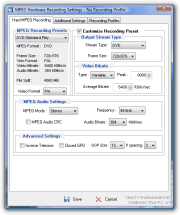
Customize any MPEG Hardware Recording Settings (available only for TV Cards with Falcon, Blackbird chipsets, Hauppauge PVRs, ATI Theater 550/650): output stream type, frame size, video bitrate, audio bitrate. You can create recording profiles that will be used for scheduled recordings.
available for software encoding cards and MPEG hardware encoding cards with LivePreview support

In the "AVI Information Panel" you can see what are the video input settings and the video/audio compression codecs that you use.
When the recording mode is on, you can see live statistics about the captured file in the "Recording Information Panel".
 Here you can easily set the video stream format : Frame Size, Frames per second etc.
Also with ChrisTV you can use video/audio compression codecs installed on your PC.
Available only in ChrisTV Professional:
Advanced Video Frame Cropping Function - you can remove undesirable frame lines (top,bottom,left and/or right). Advanced AVI File Settings :
AVI MUX - you can set the master stream and the video and audio interleaving mode.
Synchronizing video and audio : using streams offset or offset audio stream by n ms.
Recording segmentation - The segment size option helps you to make files for CD ready - 600 MB, 650 MB, 700 MB.
Software MPEG Recording Module
available for software encoding cards and MPEG hardware encoding cards with LivePreview support
(Registered MPEG 1/2 Filter required to be installed)

In the "MPEG File Information Panel" you can see what are the MPEG video/audio settings that you use for recording.
When the recording mode is on, you can see live statistics about the captured file in the "Recording Information Panel".
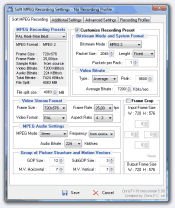
You can choose between predefined MPEG recording presets and create SVCD, VCD, DVD compatible MPEG files.
Customizing MPEG recording Presets is available only in ChrisTV Professional.
You can easily change the video stream format settings : Frame Size, Frames per second and the audio stream settings : audio bitrate, frequency.
Also you can use the advanced Video Frame Cropping Function, in order to remove undesirable frame lines (top,bottom,left and/or right).
Additional Recording Settings
Common Settings Tab
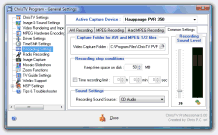
- You can set any local path or shared drive from the network as Video Capture Folder.
- Recording stop conditions : you can set the free space on the capture drive that you want to keep and the duration for the capture using the Time recording limit option.
- Set the best recording sound level just by checking the VU meter.
Advanced Settings Tab
(Available only in ChrisTV Professional Version)

During AVI and sof MPEG recording you can apply Processing Filters to the TV image :
- Image Processing Filters : Emboss, Grey, Invert etc.
- Dscaler Deinterlace Filters : Two Frame, Weave etc.
Additional Settings :
- Use SmartTee Directshow Filter.
- Disable Preview while Recording (for reducing the CPU usage while recording).
Profile Recording Settings Tab
(Available only in ChrisTV Professional Version)

You can save all your video/audio recording settings into a Recording Profile and load the saved profile whenever you want to use it again by a single click only.